Photo-first cards
Every setup is a photo, not a filename. Up to 7 angles per setup — swipe through them right on the card.
FOR PHOTOGRAPHERS WHO LIGHT
LightVault is a private library for your lighting — the photos, the gear, the power settings, the camera numbers, the notes. Saved the day you shot it. Back in your hands the day you need it again.
STEP INSIDE
This is a real card — the builder's actual go-to, untouched, settings and all. Gear saves once and lives as one-tap pills forever. Everything below is clickable, exactly like the real thing.
MARVIN'S REAL GO-TO — LIVE FROM HIS VAULT
“A simple one-light setup that never fails.”
YOUR CARD — FILLING IN LIVE
SIMPLE · ADDED TO YOUR HOME SCREEN
THE COLOR CODE
Shutter — green. Real light, real motion. It just controls how long light hits the sensor. Green means it's safe to move.
Aperture — gold. The look lives here — depth, falloff, glow. Gold because it's the money dial.
ISO — red. ISO isn't light — it's amplification. Fake light: raise it and the noise rises with it. You have the power to push it for a style, but it's red for a reason — think before you raise it.
Light power — blue. The power each light was set to. It rides at the end of every light's row in blue, so a flash power never gets mistaken for a shutter speed.
Real behavior, top to bottom. Your vault starts empty and private — first run offers Import From Photos (pick shots, it builds your first setup) or Create Manually.
EVERYTHING IT DOES
Drag the wall. Every card is a real feature.
Every setup is a photo, not a filename. Up to 7 angles per setup — swipe through them right on the card.
Save your B1X, your 24″ softbox, your C-stand once. Tap them into any setup forever. No retyping.
Per light: the modifier on it, the f-stop it metered, the power it was set to. The sticky note that never falls off.
Shutter, f-stop, ISO — color coded, so you always know what you're looking at.
PDFs, diagrams, JPG references, free-form notes and a to-do list — attached to the setup they belong to.
Search by name. Filter by light count tabs. Group by environment — Studio, On Location, anything you name.
Heart the keepers. Crown exactly one setup as The One — it can open itself the moment the app loads.
Duplicate a setup as a starting point. Long-press and drag to put your library in your order.
A checklist built from the setup's own gear — and the setup stays hidden until every item is checked off. You don't see the lighting until you're fully packed. Nothing gets left in the trunk. You'll never miss — or forget — a piece of gear again.
Queue tonight's three setups before you leave the house. On the day, it walks you through them in order.
"Remove the stand." Four credits a month of object removal, right on your setup photos.
Your photos, notes and specs are encrypted — only your access code opens them. And the whole vault exports as a single archive in one click, restorable any time.
Deleted setups rest in a 30-day trash. Every save keeps a rolling 24-hour history. Mistakes are reversible.
No accounts to create, no feed, no ads. A private URL and an access code. That's the whole relationship.
WHO DESIGNED IT
Marvin Ross has spent years trying to make the systems that already exist work better — fine-tuning them, building every hotkey he could to make the work move faster. Building setups in the studio, breaking them down at midnight, and losing the recipe somewhere in between. Because as a photographer, you know how many other things are on your mind at the end of a shoot.
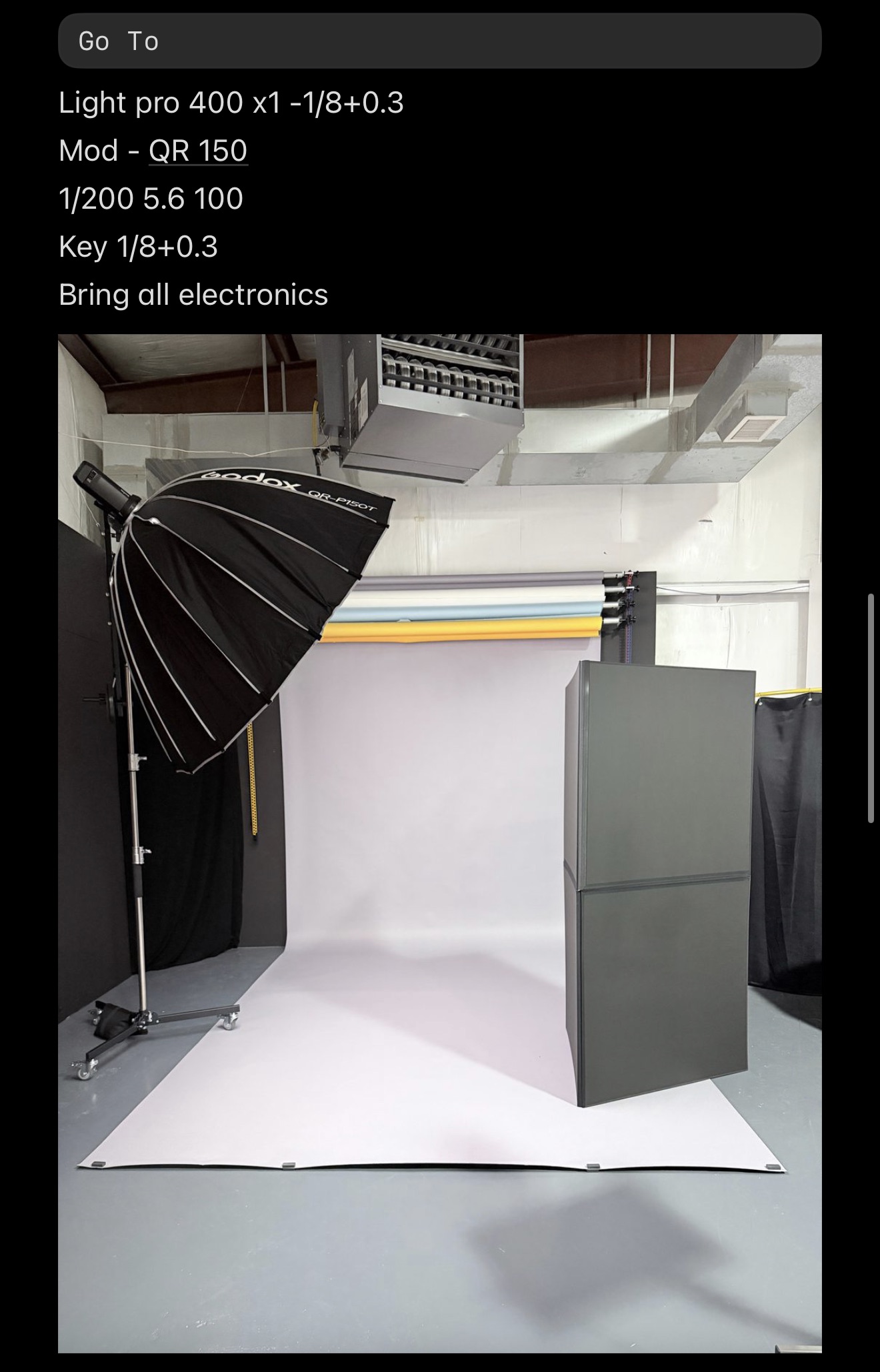
He used to put all of his settings in reference photos, inside of his notes As you can see, that would get the job done — but not the way it should be done.
So he designed the tool he always wished existed. LightVault is what his own prep looks like now: every setup he's ever liked, photographed, specced and saved. He uses it on every shoot, which is exactly why it keeps getting better: when something annoys him on a location day, it's usually fixed by the time the cards are backed up.
That's the deal with tools built by the person who needs them. Nothing in LightVault is decoration. Prelight Mode exists because a tether cord! once got forgotten. The Light Power grid exists because "around f/8?" is not an answer. You're not buying software from a company — you're borrowing a working photographer's memory.
MONTHLY SUBSCRIPTION
monthly subscription · your own private vault · cancel anytime
Launching within the month. Tap to be first in line.